

Yes, 8GB RAM is sufficient for basic tasks like browsing, online classes, office work, and media consumption. For heavier multitasking, 16GB is a better choice.
We independently review everything we recommend. When you buy through our links, we may earn a commission. How we evaluate
Best Laptops Under ₹50,000 for Work and Study 2026
Last updated 15th February 2026
9 min read
Table of Contents
Buying a laptop under ₹50,000 in India is all about balance. At this price, you can easily handle daily work, online classes, content streaming, basic editing, coding practice, and even light gaming. The key is knowing which specs actually matter. A newer generation processor, at least 8GB RAM, and an SSD can make a massive difference in day-to-day speed compared to flashy features that look good on paper but don’t improve real performance.
Many laptops in this range look similar, which makes it easy to overspend on the wrong configuration. Small details like display quality, keyboard comfort, battery life, and upgrade options often decide whether the laptop feels smooth after a year or starts slowing down quickly. The goal is not just to find something affordable, but to choose a machine that stays reliable, responsive, and worth your money for the long run.
Quick Links
Top Picks: Laptops Under ₹50,000 in India
Here are some of the most reliable and value-for-money laptops you can buy under ₹50,000 in India. These options are selected based on real-world performance, build quality, battery life, and overall usability for work, study, and light gaming.
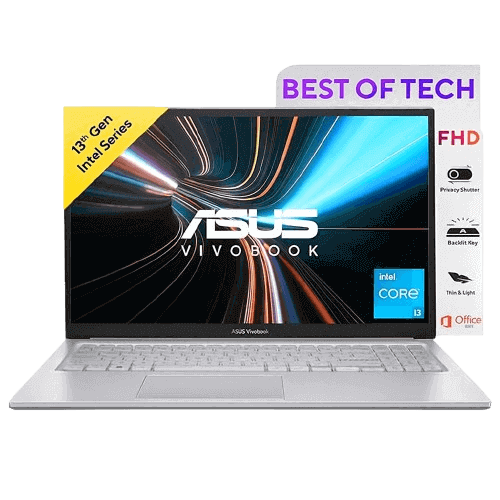
1. ASUS Vivobook 15
4.2
4.2
4.2
4.2
₹49,290₹49,290
Prices may vary by location and availability, so check the latest price before buying to avoid any surprises.
Pros
- 13th Gen Intel Core i3 processor
- 16GB RAM for strong multitasking
- 512GB SSD for fast performance
- Full HD anti-glare touchscreen display
- Backlit keyboard and modern connectivity
- Office Home 2024 + Microsoft 365 Basic included
Cons
- Integrated graphics only
- Average color accuracy (45% NTSC)
- 720p webcam
The ASUS Vivobook 15 delivers balanced performance with its 13th Gen Intel Core i3-1315U processor, 16GB RAM, and 512GB SSD. It handles multitasking, office work, browsing, and coding smoothly without slowdowns.
The 15.6-inch Full HD touchscreen display adds flexibility for everyday use, while features like a backlit keyboard and Wi-Fi 6E improve overall usability. With Windows 11, Office Home 2024, and Microsoft 365 Basic included, it is ready for both work and study.
This Product Is For:
- Students and office users
- Multitasking and productivity work
- Users who want 16GB RAM under budget
This Product Is Not For:
- Gaming or GPU-heavy tasks
- Professional creative workloads like video editing
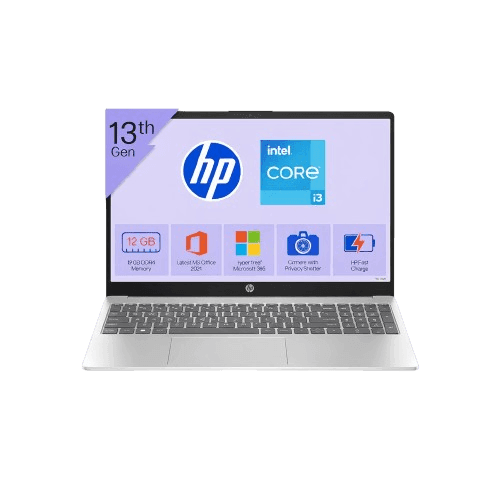
2. HP 15
4.1
4.1
4.1
4.1
₹48,500₹48,500
Prices may vary by location and availability, so check the latest price before buying to avoid any surprises.
Pros
- 13th Gen Intel Core i3 processor
- 8GB RAM for everyday multitasking
- 512GB SSD for fast performance
- Full HD anti-glare micro-edge display
- 1080p FHD webcam for clear video calls
- Windows 11 with Office Home 2021 included
Cons
- Not ideal for heavy multitasking
- Integrated graphics only
- Basic design and build quality
The HP 15 offers solid everyday performance with its 13th Gen Intel Core i3-1315U processor, 8GB RAM, and 512GB SSD. It is suitable for office work, online classes, browsing, and light productivity tasks.
The 15.6-inch Full HD anti-glare micro-edge display provides a clean viewing experience, while the 1080p webcam is useful for meetings and calls. With Windows 11 and Office Home 2021 pre-installed, it is ready for immediate use.
This Product Is For:
- Students and office users
- Daily productivity and online work
- Users who need a good webcam for meetings
This Product Is Not For:
- Heavy multitasking or professional workloads
- Gaming or creative tasks like video editing
3. Acer Aspire Lite
4.0
4.0
4.0
4.0
₹45,990₹45,990
Prices may vary by location and availability, so check the latest price before buying to avoid any surprises.
Pros
- AMD Ryzen 5 5625U processor
- 16GB RAM with upgrade option
- 512GB SSD with expansion support
- Full HD display for daily use
- Lightweight metal body design
- Numeric keypad for productivity
Cons
- No pre-installed Office
- TN panel with average viewing angles
- Basic 720p webcam
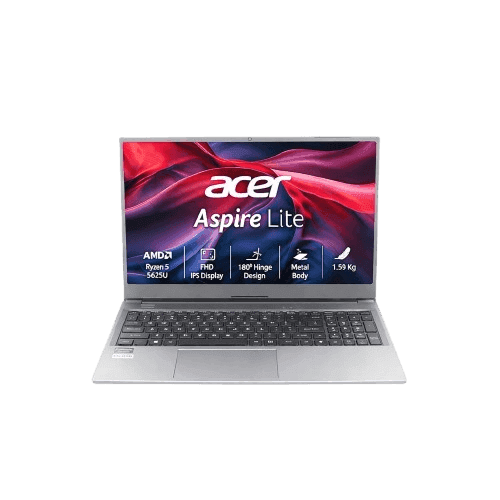
The Acer Aspire Lite offers strong value with its Ryzen 5 5625U processor, 16GB RAM, and 512GB SSD. It handles multitasking, office work, browsing, and light coding efficiently.
The 15.6-inch Full HD display is suitable for everyday tasks, while the metal body adds a more premium feel compared to typical budget laptops. With upgrade options for both RAM and storage, it gives flexibility for future use.
This Product Is For:
- Students and office users
- Multitasking and productivity work
- Users who want upgrade flexibility
This Product Is Not For:
- High-end gaming
- Professional creative workloads like video editing
4. Lenovo IdeaPad Slim 3
4.2
4.2

4.2
4.2
₹47,394₹47,394
Prices may vary by location and availability, so check the latest price before buying to avoid any surprises.
Pros
- AMD Ryzen 5 5625U processor
- 16GB RAM for smooth multitasking
- 512GB SSD with expansion option
- Full HD anti-glare display with low blue light
- Comes with Kaspersky security subscription
Cons
- RAM not upgradeable
- Integrated graphics only
- Average brightness for outdoor use
The Lenovo IdeaPad Slim 3 delivers reliable everyday performance with its AMD Ryzen 5 5625U processor, 16GB RAM, and 512GB SSD. It handles office tasks, browsing, coding, and multitasking smoothly without slowdowns.
The 15.6-inch Full HD anti-glare display reduces eye strain with TUV low blue light support, making it suitable for long working hours. Pre-installed Windows 11, Office Home 2024, and added Kaspersky protection make it ready for secure and productive use.
This Product Is For:
- Students and office users
- Daily multitasking and productivity work
- Users who want security features included
This Product Is Not For:
- Heavy gaming
- High-end creative workloads like 3D or video editing
5. ASUS Vivobook Go 15
3.8
3.8
3.8
3.8
₹48,590₹48,590
Prices may vary by location and availability, so check the latest price before buying to avoid any surprises.
Pros
- AMD Ryzen 5 7520U processor
- Fast LPDDR5 RAM for daily tasks
- 512GB SSD for quick boot and storage
- Full HD anti-glare display
- Lightweight and portable design
- Office Home 2024 + Microsoft 365 Basic included
Cons
- 8GB RAM only, not ideal for heavy multitasking
- Integrated graphics only
- Average color accuracy and brightness
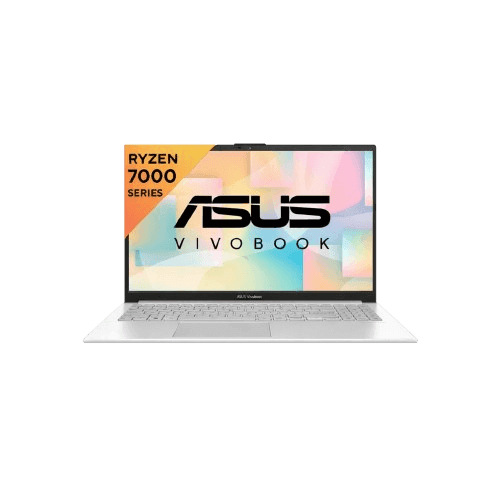
The ASUS Vivobook Go 15 is built for everyday use with its Ryzen 5 7520U processor, 8GB LPDDR5 RAM, and 512GB SSD. It handles browsing, office work, streaming, and light coding smoothly.
The 15.6-inch Full HD anti-glare display is comfortable for long usage, and the lightweight build makes it easy to carry. With Windows 11, Office Home 2024, and Microsoft 365 Basic included, it is ready for basic productivity right out of the box.
This Product Is For:
- Students and casual users
- Daily tasks like browsing, streaming, and office work
- Users who want a lightweight laptop
This Product Is Not For:
- Heavy multitasking or large workloads
- Gaming or high-end creative work
How to Choose the Right Laptop Under ₹50,000
Buying a laptop under ₹50,000 is about picking the right balance of performance, storage, display quality, and long-term usability.
-
Processor: In this range, you will find Intel Core i3 (13th Gen), some i5 variants, and AMD Ryzen 5 processors. For smooth everyday performance and multitasking, Ryzen 5 or newer i3/i5 chips are the better choice.
-
RAM: 8GB is enough for basic tasks like browsing and office work. 16GB is ideal if you want smoother multitasking and better long-term performance.
-
Storage: A 512GB SSD is the standard and should be your minimum choice. It ensures fast boot time and quick app loading.
-
Graphics: Most laptops in this range come with integrated graphics. They are fine for daily tasks and light gaming, but not for heavy gaming or creative workloads.
-
Display: A Full HD anti-glare display is common in this segment. Brightness and panel quality may vary, so prioritize comfort for long usage.
Best Laptop by Use Case
Matching a laptop to your needs makes it easier to choose.
-
Best for Students: HP 15 and ASUS Vivobook Go 15 are suitable for online classes, assignments, browsing, and media use.
-
Best for Office Work: ASUS Vivobook 15 and Lenovo IdeaPad Slim 3 provide reliable performance for productivity and come ready with Office support.
-
Best for Gaming: None of the listed models are built for serious gaming. They can handle light games, but not demanding titles.
-
Best for Multitasking: Acer Aspire Lite, ASUS Vivobook 15, and Lenovo IdeaPad Slim 3 with 16GB RAM handle multiple apps smoothly.
-
Best Lightweight Option: ASUS Vivobook Go 15 is a good choice for portability and daily use.
-
Best Overall Value: Acer Aspire Lite and Lenovo IdeaPad Slim 3 offer a strong balance of performance, RAM, and upgrade flexibility.
Final Thoughts
Laptops under ₹50,000 now offer a solid mix of performance, storage, and usability for students, professionals, and casual users. The key is choosing based on your usage, whether it is daily work, multitasking, or basic entertainment.
Models like the HP 15 and ASUS Vivobook Go 15 are good for basic use and everyday tasks, while the Acer Aspire Lite, ASUS Vivobook 15, and Lenovo IdeaPad Slim 3 deliver better performance for multitasking and heavier workloads.
Focus on processor, RAM, SSD, and display quality. That is what keeps a laptop fast and usable over time without overspending.
Frequently Asked Questions
These laptops can handle light and casual games using integrated graphics. They are not suitable for high-end or competitive gaming.
Yes. SSDs provide faster boot times, quicker app loading, and smoother overall performance.
Both are reliable. Ryzen 5 and newer Intel i3/i5 processors offer strong performance for daily tasks and multitasking.
Important. A Full HD anti-glare display ensures better comfort for long work or study sessions.
Published 22nd September 2025
About the Author

Lightning MQ | Insights Analyst
Hi! I’m a developer, content writer, and product reviewer with over three years of experience. I enjoy exploring the latest technology, testing product and gadgets, and sharing clear, honest insights. My goal is to help readers make informed decisions while keeping tech easy, fun, and approachable.